Bear Rider: A Fluffy Display Font for Standout Branding
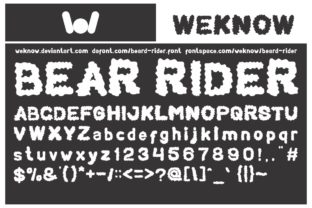
There’s something about starting a new brand identity project that feels like opening a blank canvas. Recently, I found myself staring at a fresh brand board, trying to find the right voice for a local bakery's visual refresh. I needed a font that felt warm, inviting, and just a little whimsical. That’s when I landed on Bear Rider—a fluffy display font with a unique feel, inspired by clouds.
A Cloudy Inspiration with a Bold Personality
Bear Rider is not your average display font. It has a softness to it, almost like it was sculpted from cotton candy or whipped cream. The rounded edges and gentle curves give it a playful yet approachable vibe, making it perfect for brands that want to convey comfort, creativity, and charm.
As I tested it on a logo concept for the bakery, I noticed how well it balanced between being fun and professional. It didn’t scream “childish” or “unreliable”—instead, it exuded a sense of warmth that felt right for a brand focused on community and quality baked goods.
Bear Rider in Action: Real-World Branding Applications
I used Bear Rider across several branding elements for the bakery project. On the packaging mockup, it looked great as a headline on the front of the box—its soft curves complemented the pastel colors and hand-drawn illustrations. For the business cards, I paired it with a clean sans-serif font for body text, which helped maintain readability without losing the character of the brand.
On the website header, Bear Rider stood out against a neutral background, drawing attention to the brand name without overwhelming the user. In social media graphics, it added a friendly touch to promotional posts, especially when used in short phrases or taglines.
However, I did notice that Bear Rider isn’t ideal for long-form content. When I tried using it in a blog post, the text became hard to read, especially in smaller sizes. It’s best suited as a display font—used sparingly for headlines, logos, and accents rather than for large blocks of body text.
Font Pairing and Styling Tips
One thing I appreciate about Bear Rider is its versatility in font pairing. For a more modern look, I paired it with a sleek sans-serif like Helvetica Neue for body text. For a more organic feel, I used it alongside a script font for callouts or decorative elements.
The font comes with a few alternate characters and ligatures, which can be handy for adding subtle flair to logos or headings. However, I recommend testing these features in context before finalizing any design, as they can significantly affect the overall look and feel.
It’s also worth noting that Bear Rider supports multiple languages and offers webfont availability, which makes it a solid choice for digital projects like websites or social media assets.
When to Use (and Avoid) Bear Rider
Bear Rider shines in projects that need a touch of personality and playfulness. Think boutique identities, café visuals, handmade shops, or creative studios looking to stand out from the crowd. It works beautifully on product labels, packaging, hero sections, Instagram posts, and printed cards.
That said, it’s not the go-to font for formal corporate use, legal documents, or anything requiring strict typographic consistency over long passages. Its fluffiness can sometimes clash with more serious tones, so it’s best reserved for brands that embrace a relaxed, creative, or lifestyle-oriented aesthetic.
Practical Advice Before Finalizing Your Design
If you’re considering Bear Rider for a client project, I recommend testing it in various contexts first. Print it out at different sizes, see how it looks on screen, and check its legibility in both light and dark backgrounds. Also, don’t forget to review the commercial font licensing terms before using it in brand identity, packaging, templates, merchandise, or any other client deliverables.
Fonts are more than just letters—they shape how a brand is perceived. Bear Rider brings a unique energy to the table, and when used thoughtfully, it can elevate a design from good to unforgettable.